
|
|
|
|
Rule-Based Duplicate Files Removal Actions
DupScout Server and DupScout Enterprise provide power computer users and IT professionals with the ability to define multiple, rule-based duplicate files removal actions capable of automatically detecting the original file and selecting an appropriate duplicates removal action for each specific duplicate files set according to the user-defined rules and policies. 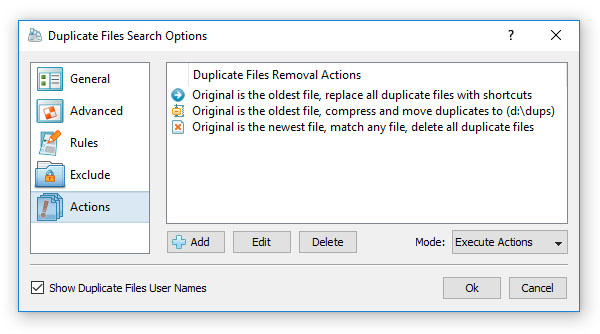
In order to add one or more duplicates removal actions, open the profile dialog, select the 'Actions' tab and press the 'Add' button. By default, the 'Action' dialog shows basic options allowing one to select the original file detection mode and the removal action that should be used for all successfully matched duplicate file sets. 
More advanced options may be enabled by pressing the 'More Options' button, which is located in the bottom-left corner of the dialog. In the advanced mode, the dialog allows one to define one or more file matching rules that should be used in order to detect the type of duplicate files that should be processed by this specific duplicates removal action. 
In order to apply different duplicate files removal actions for different types of files, specify multiple, rule-based removal actions and select an appropriate actions mode. In the 'Select Actions' mode, DupScout will scan the specified input disks or directories, select the defined removal actions for all duplicate file sets matching the specified rules and show an actions preview dialog allowing one to review the selected actions before execution. 
Another option is to set the actions mode to 'Execute' and to use the DupScout command line utility to execute the specified duplicate files removal actions fully automatically in an unattended mode.
|
DupScout News
|


