DupScout Logo

Excluding Directories from Duplicate Files Search Process

Sometimes, it may be required to exclude one or more subdirectories from the duplicate files detection process. For example, if you need to find all duplicate files on a disk excluding one or two special directories, you may specify the whole disk as an input directory and add the directories that should be skipped to the exclude list.
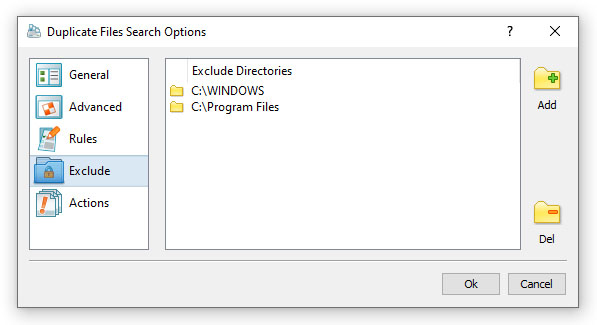
In order to add one or more directories to the exclude list, press the 'Manage Profile' button to open the profile dialog, select the 'Exclude' tab and press the 'Add' button. In addition, advanced users are provided with a number of exclude directories macro commands allowing one to exclude multiple directories using a single macro command.

DupScout provides the following exclude directories macro commands:

  • $BEGINS <Text String> - this macro command excludes all directories beginning with the specified text string.
  • $CONTAINS <Text String> - this macro command excludes all directories containing the specified text string.
  • $ENDS <Text String> - this macro command excludes directories ending with the specified text string.
  • $REGEX <Regular Expression> - this macro command excludes all directories matching the specified regular expression.

For example, the exclude macro command '$CONTAINS Temporary Files' will exclude all directories with 'Temporary Files' at any place in the full directory path and the exclude macro command '$REGEX \.(TMP|TEMP)$' will exclude all directories ending with '.TMP' or '.TEMP'.

DupScout News

12-May-2026

DupScout v18.1 adds a new, adaptive duplicate files search mode, adds support for new file types to the built-in file classification plug-ins allowing one to search specific types of duplicate files and improves the duplicate files search statistics pie charts. In addition, the new version improves the duplicate files search options dialog, improves the DupScout command line utility and fixes a number of bugs.

10-Apr-2026

DupScout v18.0 redesigns the duplicate files search results dialog, adds the ability to filter file search reports by the report ID and improves the file search reports dialog. In addition, the new product version improves the JSON, CSV and XML duplicate files search reports, improves the main DupScout GUI application and fixes a number of bugs.

More News