Sometimes, it may be required to exclude one or more subdirectories from the duplicate files
detection process. For example, if you need to find all duplicate files on a disk excluding
one or two special directories, you may specify the whole disk as an input directory and add
the directories that should be skipped to the exclude list.
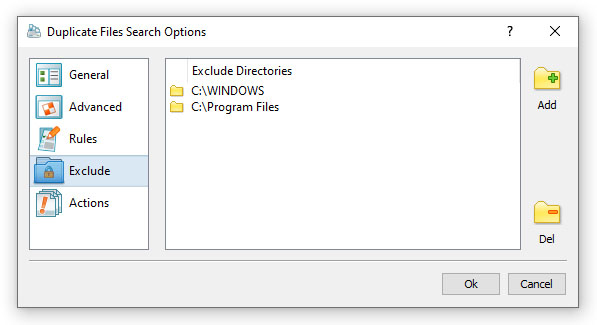
In order to add one or more directories to the exclude list, press the 'Manage Profile' button
to open the profile dialog, select the 'Exclude' tab and press the 'Add' button. In addition,
advanced users are provided with a number of exclude directories macro commands allowing one
to exclude multiple directories using a single macro command.
DupScout provides the following exclude directories macro commands:
- $BEGINS <Text String> - this macro command excludes all directories beginning with the specified text string.
- $CONTAINS <Text String> - this macro command excludes all directories containing the specified text string.
- $ENDS <Text String> - this macro command excludes directories ending with the specified text string.
- $REGEX <Regular Expression> - this macro command excludes all directories matching the specified regular expression.
For example, the exclude macro command '$CONTAINS Temporary Files' will exclude all directories with 'Temporary Files'
at any place in the full directory path and the exclude macro command '$REGEX \.(TMP|TEMP)$' will exclude all directories
ending with '.TMP' or '.TEMP'.


